

|
|
Download this manual as rtf file
Pickups in MSTS
For a quick Conclusion see last item of this document below.
Where the properties of a Pickup are saved
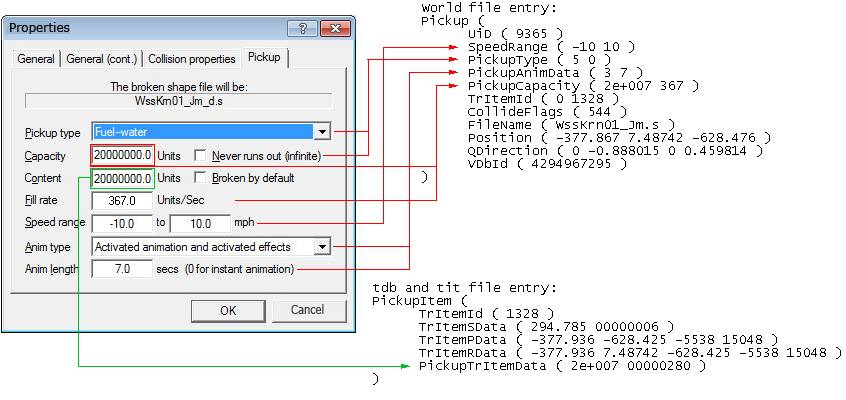
NOTE!: After placing and saving a pickup with MSTS Route Editor the entry in tdb and tit file is written wrong!
tdb and tit file entry wrong:
PickupItem (
TrItemId ( 1328 )
TrItemSData ( 294.785 00000006 )
TrItemPData ( -377.936 -628.425 -5538 15048 )
TrItemRData ( -377.936 7.48742 -628.425 -5538 15048 )
PickupTrItemData ( 200000 00000000 )
)
Instead of 00000000 for a watercolumn pickup 00000280 must be used. A right entry in tdb and tit files is:
tdb and tit file entry right:
PickupItem (
TrItemId ( 1328 )
TrItemSData ( 294.785 00000006 )
TrItemPData ( -377.936 -628.425 -5538 15048 )
TrItemRData ( -377.936 7.48742 -628.425 -5538 15048 )
PickupTrItemData ( 2e+007 00000280 )
)
To correct this error one can either do this by hand or use the Jm tool "_Pickup-Korrektur_Jm.exe".
The property window of a pickup in Route Editor e.g. watercolumn
General
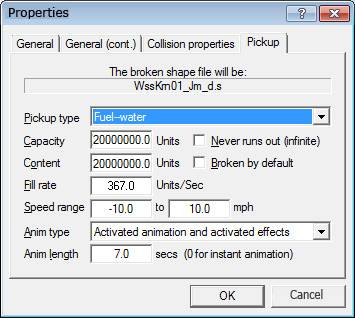
All mass units at a pickup are lb (pound). This is for water, coal and diesel the same.
Pickup type (world file)
The three in MSTS known pickup types are:
5 = Fuel - water
6 = Fuel - coal
7 = Fuel - diesel
Further by MSTS not supported types are:
1 = Freight - grain
2 = Freight - coal
3 = Freight - gravel
4 = Freight - sand
8 = Special - mail
Capacity (world file)
The capacity value is used in MSTS only if a percentage limitation is specified to a pickup. Then Capacity represents the current fill level of the pickup.
A limitation of a pickup can either be specified in Activity Editor or it is stored in tdb and tit file in the PickupTrItemData entry
(see "The PickupTrItemData entry in tdb and tit file").
The possible percentages are: 0%, 25%, 50%, 100%. The pickup can thus be declared as empty (0%) or as full (100%). This way a possibility is given to activity builders to simulate different fill levels of a pickup.
If there are no limitations (normal case), MSTS takes the value "Content" from the tdb and tit files.
Open Rails only takes into account the value of the capacity (as of Jan. 2017).
Content (tdb and tit file)
The value for Content is used in MSTS if no percentage limitation is specified for the pickup, which is the normal case. It represents the current fill level of the pickup.
When a locomotive fills up water at the watercolumn, the value Content decreases in the pickup.
Capacity/Content
As a standard, values of 20000 lb are given by MSTS. However, it should be increased to 20,000,000, so the pickup can not run out of fuel and will not be empty in the game, despite several refuelings are made.
Both values capacity and content should always be equal, so that there are no inequalities in inventories of the pickup, despite possible limitations are defined for the pickup.
Never runs out (infinite) (world file)
No effect in MSTS or OpenRails. The setting of this checkmark is stored in the pickup entry (second value of "PickupType") in the world file, but remains unaffected for the simulation.
The simulation of an endless pickup content of fuel should therefore better be realized with large values for Capacity and Content.
Broken by default (??? tdb and tit file ???)
The checkbox "Broken by default" should probably be stored in the pickup entry in the tdb and tit files. However, this does not work properly because of a bug in MSTS, this check mark is practically not working in the proberty window!
If the chekmarck would work proberly, then the pickup only could be activated in an activity.
The options selected for a pickup in the activity editor are stored encoded in the task file (.act), e.g. as:
PickupTrItemIdData (
PickupItem ( 5 2048 )
)
The settings are encoded within the 2048 (see "The PickupTrItemData entry in tdb and tit file").
The 5 indicates the "TrItemId" in tdb and tit files.
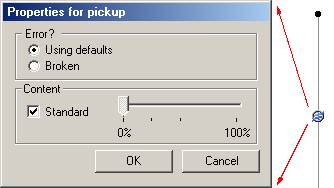
Pickup property window in Activity Editor
Fill rate (world file)
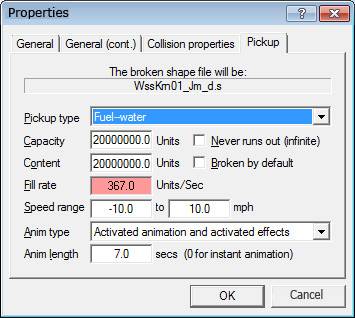
The fill rate is expected as lb/s (ponds per second). In game the amount of filling is shown in gallons.
1 gallon = 10 lb = 4,54609 liter
1 lb = 0,454609 liter
For example, to allow 10m³ of water per minute to be filled in from a watercolumn, the "filling rate" must be set to 367.0 lb/s.
10m³ of water (10,000 liters) is 21997 lb (10000 liters / 0.454609 = 21996.9248 lb). Because the filling rate is expected in lb/s in the property window, the 21997 lb is still divided by 60 seconds:
366.6 lb (21996.9248 / 60 = 366.61541).
Speed range...to...(mph) (world file)
A speed range is specified for the locomotive within the fill up process can be done from the pickup. Examples:
• 0.0 bis 0.0 -> The locomotive must stop at the pickup to fill up
• 0.0 bis 10.0 -> The locomotive can fill up fuel when travel forward up to 10 mph
•-10.0 bis 10.0 -> The locomotive can fill up fuel when travel forward or backward up to 10 mph
•-10.0 bis 0.0 -> The locomotive can fill up fuel only when travel backward up to 10 mph
Anim type (world file)
0 Only activated animationen Cran moves by T key - Water starts filling at aimation start (instantly with T)
1 Only animation of near Objects Cran don't move - Wasser fill up if T key is pressed
2 Only activated effects Cran don't move - Water don't fill up
3 Activated animationen and activated effects Cran moves by T key - Water fill up at end of animation (Cran is over loco)
4 Animation near objects and activated effects Cran don't move - Water don't fill up
5 Only On-empty-animation Cran moves and stayes - Wasser fill up if T key is pressed
6 Only fuel pipe Cran don't move - Wasser fill up if T key is pressed
Anim type 3 is default typ of MSTS and sould always be used.
In Open Rails the Anim types aren't supported.
Anim lenght (world file)
Duration of the animation of the pickup.
A pickup can have an animation of e.g. 2 key frames to show the swings of the water crane. "Anim length" indicates the time in seconds the swing for the crane will take.
The PickupTrItemData entry in tdb and tit files
The PickupTrItemData entry in tdb and tit files has two values.
PickupItem (
TrItemId ( 5 )
TrItemSData ( 628.683 00000006 )
TrItemPData ( -116.257 253.084 -5578 14976 )
TrItemRData ( -116.257 1 253.084 -5578 14976 )
PickupTrItemData ( 2e+007 00000280 )
)
The first value represents the Content of the pickup. Its unit is lb (pounds). The value should always be quite large, so that the pickup in game can't run out empty.
If there are no percentage limits for the pickup, the value is used as the maximum content of the pickup at the start of the game. In the case the pickup is limited, this value is ignored and the value from the world file (PickupCapacity) is used instead. Limitations for a pickup can be specified either in the avtivity editor or direct in the tdb entry PickupTrItemData (see below).
The "infinity" checkbox in the Pickups properties window is stored in the world file, but has no effect on the filling process!
In OpenRails (as of Jan. 2017) the PickupTrItemData value from the tdb is never considered, but always the world file value.
The second Value is an eight digit hexadecimal Value! The leading zeros are important, otherwise MSTS crashes!
This value foremost defines the type of the pickup. Where:
|
|
hex |
|
|
bin |
|
|
|
00000080 |
= Freight grain |
-> |
00010000000 |
|
|
|
00000100 |
= Freight coal |
-> |
00100000000 |
|
|
|
00000180 |
= Freight gravel |
-> |
00110000000 |
|
|
|
00000200 |
= Freight sand |
-> |
01000000000 |
|
|
|
00000280 |
= Fuel water |
-> |
01010000000 |
|
|
|
00000300 |
= Fuel coal |
-> |
01100000000 |
|
|
|
00000380 |
= Fuel diesel |
-> |
01110000000 |
|
|
|
00000200 |
= Special train post |
-> |
10000000000 |
|
--------------------------------------------------------------------------------------------------------------------
In the same hexadecimal value, however, other options can also be encoded about a pickup.
(how it can explored see below: Exploring the pickup options using the Activity Editor).
Bit 13 to 16: Encodiung the fill level of a pickup:
dez hex binär meaning
4096 00001000 0001000000000000 0% Pickup is empty
8192 00002000 0010000000000000 25% Pickup is filled a quater of content
16384 00004000 0100000000000000 50% Pickup is filled half of content
32768 00008000 1000000000000000 100% Pickup is complete filled up
Bit 12: Encodiung the fill level of a broken pickup:
dez hex binär meaning
2048 00000800 0000100000000000 Pickup is broken
6144 00001800 0001100000000000 0% Pickup is broken and empty
10240 00002800 0010100000000000 25% Pickup is broken and filled a quater of content
18432 00004800 0100100000000000 50% Pickup is broken and filled half of content
34816 00008800 1000100000000000 100% Pickup is broken and complete filled up
Thus Bit 12 indicates that the pickup is broken (out of order). But this option does not have any effect to game in MSTS. Both in activities as well as in exploring mode, pickups are always in operation, even if this Bit 12 is set.
--------------------------------------------------------------------------------------------------------------------
Example of a watercolumn pickup which is in operation and has different fill levels:
dez hex binär
640 00000280 0000001010000000
4736 00001280 0001001010000000 0%
8832 00002280 0010001010000000 25%
17024 00004280 0100001010000000 50%
33408 00008280 1000001010000000 100%
considered Binary
One encodes the pickup by using the first Bits 1 to 10 according to the desired pickup type. For a water column this would be 1010000000. The fill level of this water column is then further defined with the Bits 12 to 16. If, for example, it should be filled with 50%, then 010000 is set first as Bits 11 to 16 of this:
1010000000 Watercolumn
0100000000000000 50% - filled half of content
----------------
0100001010000000
This binary number 0100001010000000 would then be entered as hexadecimal string 00004280 in the tdb and tit files for the pickup.
considered Hexadecimal
The pickup is encoded by the first three digits defining the pickup type. For a water column this would be 00000280. The fill level of this watercolumn is then further defined with the fourth digit. If, for example, it is filled with 50%, then a 4 is inserted at the fourth digit: 00004280
This hexadecimal string 00004280 is then to be inserted in the tdb and tit files for the pickup.
This is how this pickup will looks like in
Activity Editor: 
--------------------------------------------------------------------------------------------------------------------
Exploring the pickup options using the Activity Editor
The option codes can be explored by clicking on a pickup with the right mouse button in the Activity Editor and change settings for the pickup in the properties window. E. g. if removing the check mark "Standard", next to the pickup the label "0%" will be seen.
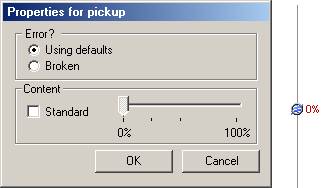
The changed options of the pickup will be saved in the activity file (.act) like this:
PickupTrItemData (
PickupItem ( 5 4096 )
)
The decimal value 4096 indicates that the Content of the pickup with the tdb index 5 ("TrItemId ( 5 )") will be empty in the activity.
If you transfer the decimal value 4096 to a hexadecimal you get 1000.
In the activity MSTS adds the 1000 to the 00000280 of the pickup given from the tdb file. The result will be 00001280. That means "0%" and in the activity the locomotive can't get any water from the pickup.
Conclusion
• Capacity and Content should be very large values, e.g. 20'000'000 lb for water, thus a pickup never runs out of fuel in the game. Both values should always be the same, so that a pickup with and without a limitation always has the same reserve.
• The unit for all quantities of the pickup is lb (pounds).
• Both checkmarks "Never runs out" and "Broken by default" have no effect in MSTS game.